When My DevSecOps Lab Started Consuming 95% CPU: A Practical Lesson in Container Resource Governance

A real incident from a local DevSecOps lab: while building a security-focused microservices environment on an 8 GB MacBook Air, my Docker + Kind Kubernetes cluster began consuming several CPU cores and multiple gigabytes of RAM. Instead of treating it as just a laptop performance problem, I used it as a lesson in resource governance, availability, container security, and DevSecOps engineering.
Introduction
One of the easiest mistakes to make while learning DevOps or DevSecOps is to think primarily about whether an application works.
The application builds.
The containers start.
Kubernetes becomes Ready.
The CI/CD pipeline passes.
The security scanners produce reports.
Everything looks successful.
But there is another question that production systems have to answer:
What happens when a workload consumes more resources than it should?
I encountered that question unexpectedly while working on a DevSecOps project involving Docker, Kubernetes, microservices, CI/CD, and security controls.
My development machine is an 8 GB RAM MacBook Air with a 256 GB SSD. I was running a local Kubernetes cluster using Kind, with the cluster nodes implemented as Docker containers.
Then Docker Desktop started showing numbers that were impossible to ignore.
At different moments, Docker Desktop showed aggregate container CPU readings around:
- 562.98%
- 826.75%
- 1114.92%
- 1773.05%
The host was also heavily loaded, and one screenshot showed Docker using approximately 4.81 GB of container memory out of a 5.65 GB Docker allocation.
This was not an external attack.
There is also no evidence from these observations alone that the machine was compromised.
It was a development environment under excessive workload.
And that distinction is important.
The incident demonstrated a security and reliability problem that is closely related to resource exhaustion and denial-of-service risk.
This article explains what happened, how to reason about it technically, and what I learned from it as a DevSecOps engineer.
Incident snapshots
The following screenshots are from the local development environment during the incident. They show the resource pressure discussed in this article.
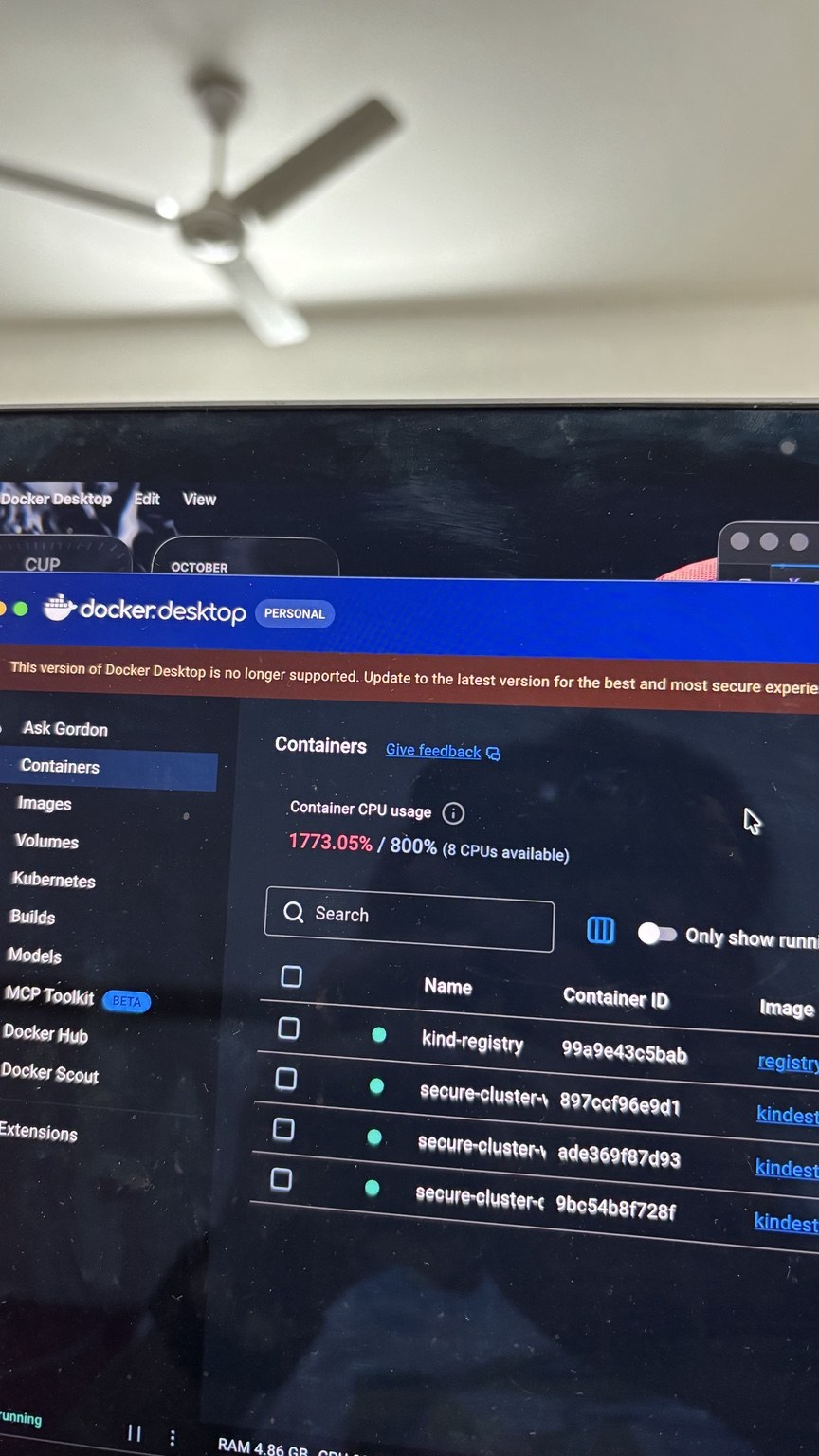 Docker Desktop showing an aggregate container CPU reading reaching approximately 1773%.
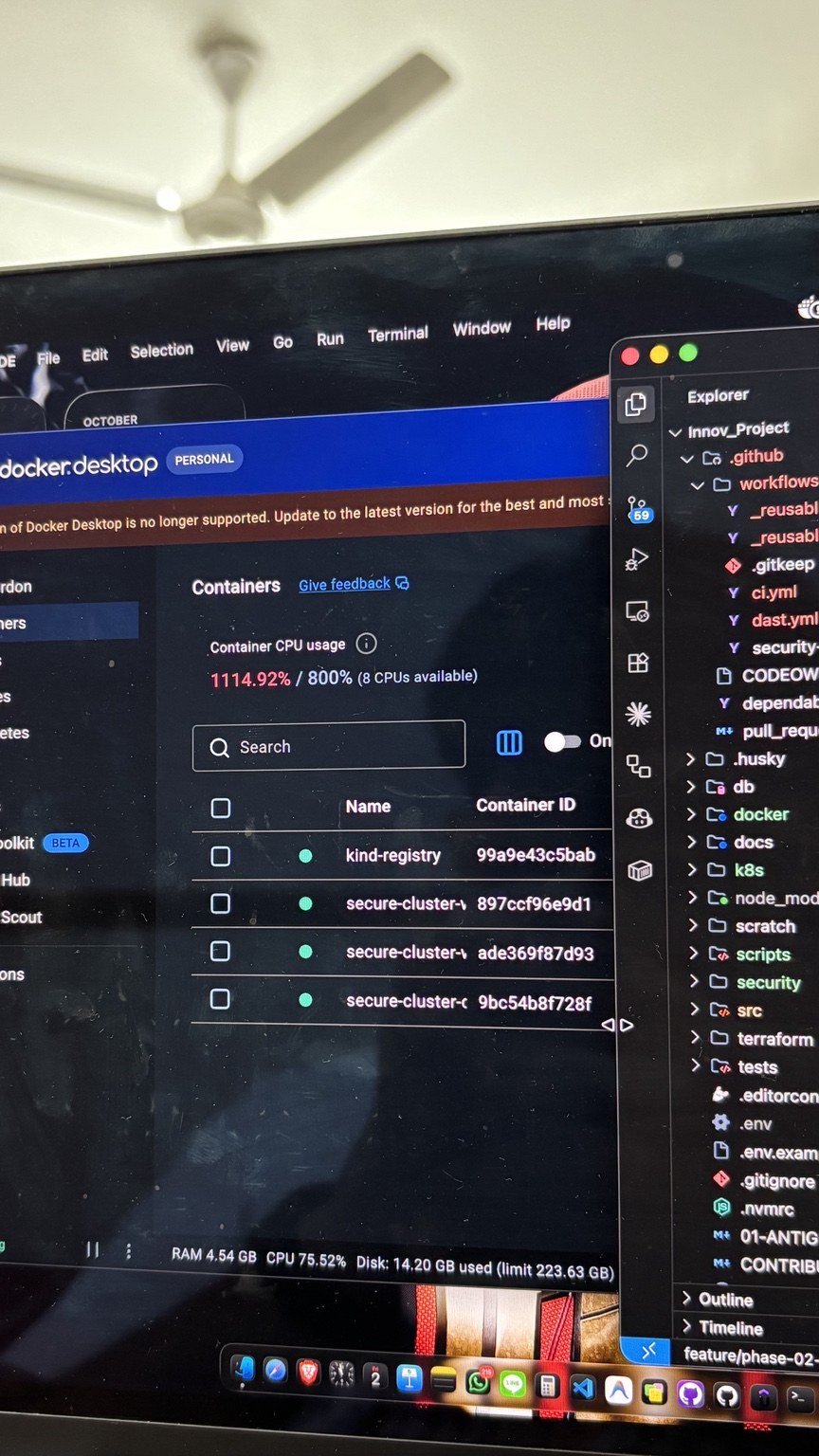 The local Kind-related containers and the high aggregate CPU reading.
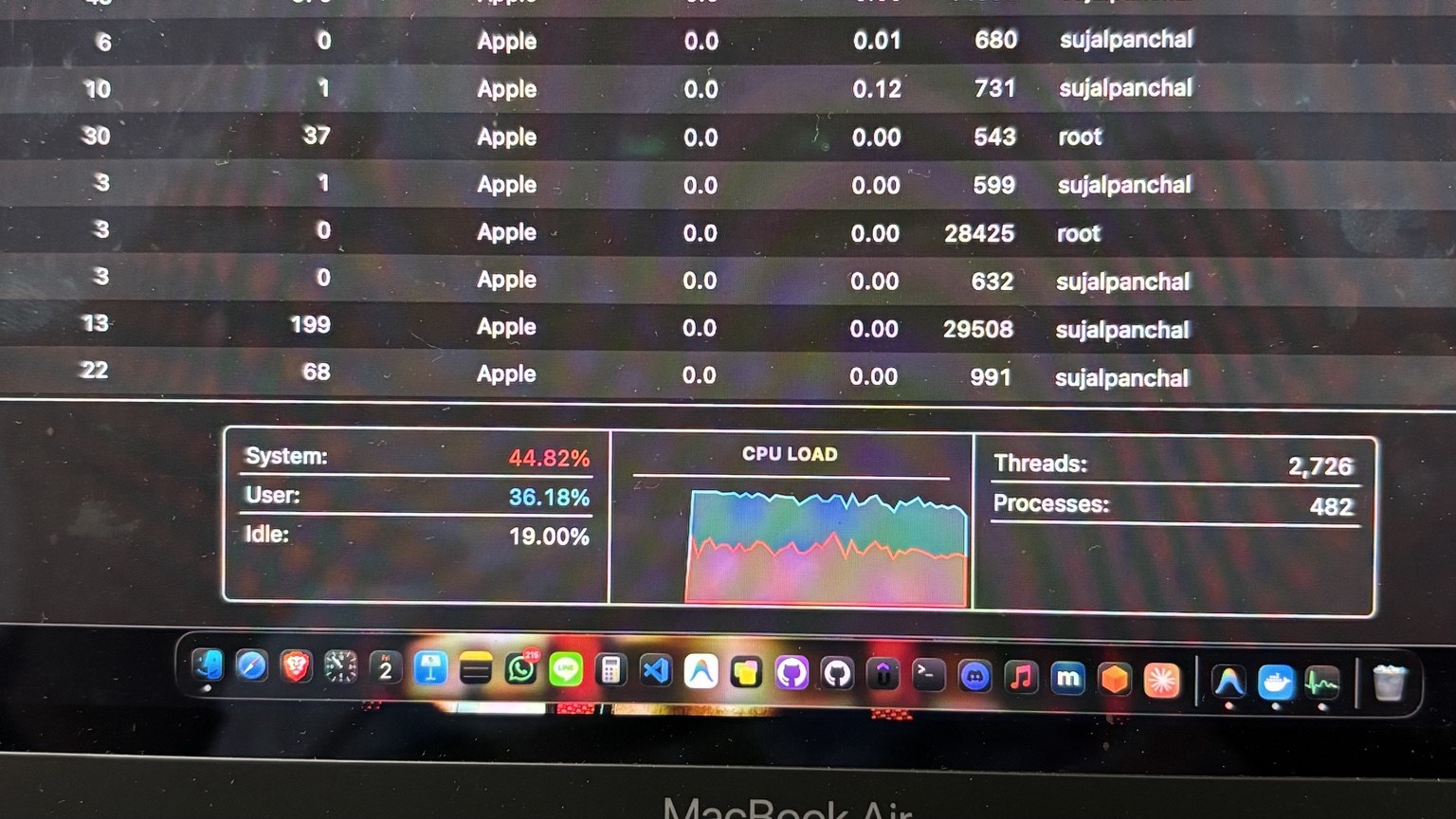 Host-level CPU pressure observed while the local environment was active.
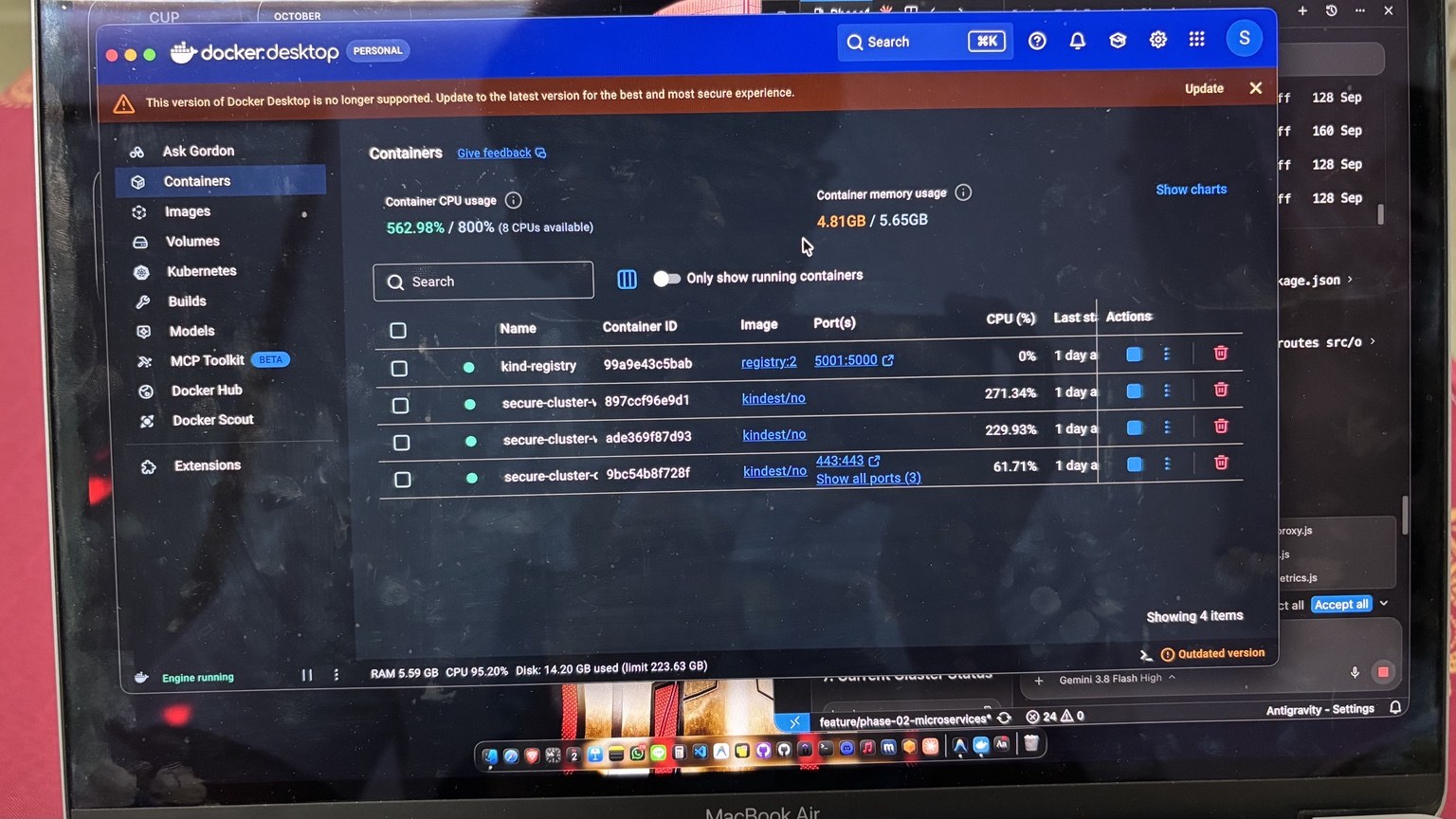 Docker Desktop showing approximately 4.81 GB of container memory usage out of a 5.65 GB allocation.
1. The Environment
The environment looked roughly like this:
                         MacBook Air
                       8 GB RAM / 256 GB SSD
                              |
                              v
                       Docker Desktop
                              |
                 +------------+-------------+
                 |                          |
          kind-registry             Kind Kubernetes Cluster
                                            |
                         +------------------+------------------+
                         |                  |                  |
                         v                  v                  v
                   secure-cluster-*   secure-cluster-*   secure-cluster-*
                         |                  |                  |
                         +------------------+------------------+
                                            |
                                      Kubernetes workloads
                                            |
                                  Microservices / security
                                       tooling / tests
The important detail is that Kind runs Kubernetes nodes as containers.
Kind’s official documentation describes it as a tool for running local Kubernetes clusters using Docker container “nodes”. This is extremely convenient for local development and CI testing, but it also means that your Kubernetes nodes participate directly in the resource budget of the machine running Docker.
Official documentation:
- Kind: https://kind.sigs.k8s.io/
- Kind Quick Start: https://kind.sigs.k8s.io/docs/user/quick-start/
This is why the Docker Desktop container list showed:
kind-registry
secure-cluster-*
secure-cluster-*
secure-cluster-*
The secure-cluster-* containers were the Kind nodes visible from Docker.
2. What the Screenshots Revealed
The most useful snapshot showed approximately:
Container CPU usage:       562.98% / 800%
Container memory usage:    4.81 GB / 5.65 GB
The individual container CPU readings were approximately:
kind-registry             0%
secure-cluster-*        271.34%
secure-cluster-*        229.93%
secure-cluster-*         61.71%
The host also showed CPU utilization around the mid-90% range in one of the snapshots.
Earlier screenshots showed the aggregate Docker CPU value climbing even further:
826.75%
1114.92%
1773.05%
These values should not be interpreted as “the Mac is 1773% busy” in the same way that Activity Monitor reports a percentage.
Docker’s stats output reports container CPU usage as a percentage, and the percentage can exceed 100% on multicore systems. Conceptually, 100% represents roughly one CPU-core equivalent of work, so 500% represents approximately five core-equivalents of CPU consumption.
Docker documents the CPU %, memory, network I/O, block I/O, and PID fields in docker stats here:
https://docs.docker.com/reference/cli/docker/container/stats/
The exact number is less important than the pattern:
The local cluster was consuming several CPU cores continuously enough to put substantial pressure on the host.
3. Why Can Docker Show More Than 100% CPU?
This confuses many people when they first use containers.
Consider an 8-core system.
If one container uses one full CPU core:
~100%
If it uses two cores:
~200%
If it uses five cores:
~500%
Therefore a container or collection of containers can legitimately produce CPU percentages greater than 100%.
That does not mean the CPU has somehow exceeded the physical limits of the processor.
It means multiple CPU cores are being consumed.
For example:
100%   ≈ 1 CPU core
200%   ≈ 2 CPU cores
400%   ≈ 4 CPU cores
800%   ≈ 8 CPU cores
The interpretation depends on the runtime and reporting context, so these should be treated as approximate core-equivalent readings rather than a universal formula for every monitoring system.
4. The Real Problem: Resource Contention
The laptop had only 8 GB of physical RAM.
At one point Docker Desktop showed approximately:
Containers:
4.81 GB / 5.65 GB
That is a significant amount of memory for a machine that also needs memory for:
- macOS
- Docker Desktop
- VS Code
- browsers
- terminals
- Git tools
- background processes
- Kubernetes tooling
- development servers
- other applications
The machine therefore had a finite resource budget.
Think about it like this:
                    8 GB Physical RAM
                           |
        +------------------+------------------+
        |                  |                  |
      macOS             Docker             Apps
                           |
                    Kubernetes / Kind
                           |
              +------------+------------+
              |            |            |
             Node         Node         Node
              |            |            |
           Workloads    Workloads    Workloads
If Docker and Kubernetes consume too much of the available budget, something else has to give.
The result can be:
- memory pressure
- memory compression
- swap activity
- CPU contention
- thermal throttling
- slow applications
- Kubernetes workloads becoming unhealthy
- containers restarting
- services becoming unavailable
- the development environment becoming effectively unusable
This is an availability problem.
5. This Is Also a Security Problem
Security is often divided into the CIA triad:
C = Confidentiality
I = Integrity
A = Availability
Developers often focus heavily on confidentiality and integrity:
- secrets
- authentication
- authorization
- vulnerabilities
- dependency attacks
- container image vulnerabilities
- code injection
- supply-chain attacks
But availability is equally important.
Imagine a malicious or buggy service doing this:
while True:
    perform_expensive_operation()
Or imagine a compromised application spawning processes aggressively.
Or a service receiving a huge amount of traffic.
Or an application accidentally creating unlimited temporary data.
Or a memory-backed volume consuming excessive RAM.
The outcome can be:
Workload
   |
   v
Excessive resource consumption
   |
   v
Node resource pressure
   |
   v
Other workloads affected
   |
   v
Service degradation
   |
   v
Availability failure
This is the general idea behind resource exhaustion.
It can be accidental or malicious.
6. Container Isolation Does Not Mean Unlimited Safety
A common misconception is:
“It’s inside a container, so it cannot affect the host.”
Containerization provides isolation mechanisms, but containers still consume host resources.
CPU, memory, storage, network bandwidth, and process capacity ultimately exist somewhere.
If resource governance is poorly configured, a workload can consume a disproportionate amount of those resources.
This is why container security is not just about:
"Can the container escape?"
It is also about:
"How much damage can the workload cause if it behaves badly?"
That is a much broader security question.
7. Kubernetes Has Resource Governance for a Reason
Kubernetes provides explicit resource requests and limits for containers.
A simplified example:
apiVersion: apps/v1
kind: Deployment
metadata:
  name: payment-service

spec:
  replicas: 2

  selector:
    matchLabels:
      app: payment-service

  template:
    metadata:
      labels:
        app: payment-service

    spec:
      containers:
        - name: payment-service
          image: payment-service:v1

          resources:
            requests:
              cpu: "100m"
              memory: "128Mi"

            limits:
              cpu: "500m"
              memory: "512Mi"
This expresses two different concepts.
Requests
A request tells Kubernetes roughly:
“I need this amount of resource for scheduling.”
For example:
requests:
  cpu: "100m"
  memory: "128Mi"
Limits
A limit says:
“Do not allow this container to consume beyond this configured ceiling.”
For example:
limits:
  cpu: "500m"
  memory: "512Mi"
Kubernetes uses requests when scheduling workloads and enforces CPU and memory limits through the container runtime and operating-system mechanisms. CPU limits are enforced through CPU throttling, while memory overuse can result in an OOM kill when the kernel detects memory pressure.
Official documentation:
https://kubernetes.io/docs/concepts/configuration/manage-resources-containers/
8. Requests and Limits Are Not the Same Thing
This distinction is important.
Suppose:
resources:
  requests:
    cpu: "100m"
    memory: "128Mi"

  limits:
    cpu: "500m"
    memory: "512Mi"
The request is:
CPU:    0.1 core
Memory: 128 MiB
The limit is:
CPU:    0.5 core
Memory: 512 MiB
The scheduler uses the request to make placement decisions.
The limit defines the maximum allowed resource consumption.
A useful mental model is:
REQUEST = scheduling budget

LIMIT   = runtime ceiling
Confusing these two leads to poorly designed Kubernetes deployments.
9. CPU Limits and Memory Limits Behave Differently
This is another important lesson.
CPU
CPU limits are enforced through throttling.
If a workload tries to consume more CPU than its configured limit, it can be throttled.
Conceptually:
Requested workload:
████████████████████

CPU limit:
█████

Actual allowed:
█████
Memory
Memory is different.
If a process tries to exceed its memory limit, the kernel can invoke out-of-memory handling and terminate a process when memory pressure is detected.
So:
CPU excess
   ↓
throttling
while:
Memory excess
   ↓
potential OOM termination
This difference matters when designing reliability and security policies.
10. Namespace-Level Protection with ResourceQuota
Container-level limits are useful, but you can also control the total resource budget of a namespace.
Example:
apiVersion: v1
kind: ResourceQuota

metadata:
  name: devsecops-quota
  namespace: devsecops

spec:
  hard:
    requests.cpu: "1"
    requests.memory: "2Gi"
    limits.cpu: "2"
    limits.memory: "3Gi"
This creates a namespace-level budget.
Conceptually:
devsecops namespace
        |
        +-- service-a
        |
        +-- service-b
        |
        +-- service-c
        |
        +-- scanner
        |
        +-- database
        |
        +-- TOTAL RESOURCE QUOTA
The namespace cannot simply grow without respecting the quota.
Kubernetes ResourceQuota documentation:
https://kubernetes.io/docs/concepts/policy/resource-quotas/
11. LimitRange: The Missing Guardrail
Another useful mechanism is LimitRange.
A LimitRange can define default, minimum, and maximum resource values for containers or Pods within a namespace.
For example:
apiVersion: v1
kind: LimitRange

metadata:
  name: container-limits
  namespace: devsecops

spec:
  limits:
    - type: Container

      default:
        cpu: "500m"
        memory: "512Mi"

      defaultRequest:
        cpu: "100m"
        memory: "128Mi"

      max:
        cpu: "1"
        memory: "1Gi"

      min:
        cpu: "50m"
        memory: "64Mi"
Now a developer who forgets to specify resources does not automatically create an entirely unbounded workload.
Kubernetes documentation:
https://kubernetes.io/docs/concepts/policy/limit-range/
12. The DevSecOps Opportunity
This is where the incident became more interesting to me.
Instead of fixing the problem manually every time, we can make resource governance part of the DevSecOps pipeline.
The pipeline can validate:
             Git Push
                |
                v
        +----------------+
        | CI/CD Pipeline |
        +----------------+
                |
       +--------+--------+
       |        |        |
      SAST   Secrets   Dependencies
       |        |        |
       +--------+--------+
                |
          Container Scan
                |
            IaC Scan
                |
       Kubernetes Policy
                |
       +--------+--------+
       |                 |
      PASS              FAIL
       |                 |
       v                 v
   Build Image          Block
       |
       v
   Deploy
The Kubernetes policy stage can check:
Does every container have:
    CPU request?        ✓
    CPU limit?          ✓
    Memory request?     ✓
    Memory limit?       ✓
If not:
❌ Deployment blocked

Reason:
Resource limits are missing.
Potential resource-exhaustion risk.
This turns resource governance from a manual habit into an automated control.
13. Policy-as-Code
A mature implementation can enforce this using policy engines or Kubernetes admission mechanisms.
For example, the policy could conceptually say:
IF container.cpu.limit is missing
THEN reject deployment

IF container.memory.limit is missing
THEN reject deployment

IF memory.limit > approved maximum
THEN reject deployment
This can be implemented using technologies such as:
- Kyverno
- Open Policy Agent / Gatekeeper
- Kubernetes ValidatingAdmissionPolicy
- CI policy checks
The architectural idea is more important than the specific tool:
Security requirements should be machine-enforceable whenever possible.
14. CI/CD Should Not Only Scan for CVEs
This incident changed how I think about the word “secure”.
A pipeline that performs only:
SAST
Dependency Scan
Container Scan
is useful.
But it does not cover every operational risk.
A stronger DevSecOps pipeline can consider:
Source Code
    |
    +-- SAST
    |
    +-- Secret Scanning
    |
    +-- Dependency / SCA
    |
    +-- IaC Scanning
    |
    +-- Container Image Scanning
    |
    +-- SBOM Generation
    |
    +-- Image Signing / Provenance
    |
    +-- Kubernetes Manifest Validation
    |
    +-- Resource Policy Validation
    |
    +-- Admission Controls
    |
    v
Deployment
The goal is not to add tools for the sake of adding tools.
The goal is to reduce the number of unsafe states that can reach runtime.
15. Observability Is Part of Security
The screenshots also taught me another lesson:
You cannot protect what you do not observe.
Docker Desktop immediately gave me a signal:
CPU:    562.98%
Memory: 4.81 GB
Without monitoring, I might have continued deploying more services.
In a production environment, you would want proper metrics and alerts.
Examples:
CPU > 80% for 5 minutes
        |
        v
       ALERT
or:
Memory > 85%
        |
        v
       ALERT
or:
Container restart rate increasing
        |
        v
       ALERT
or:
OOMKilled detected
        |
        v
       ALERT
This is where DevOps, SRE, and security begin to overlap.
16. What I Would Change in My Local Environment
An 8 GB development machine is not the right place to run every possible production component simultaneously.
Instead of:
3-node Kind cluster
+
all microservices
+
databases
+
multiple scanners
+
monitoring
+
other development tools
I can design a lighter development profile.
For example:
Local profile

1 control-plane
1 worker
Only required microservices
Security scanners run on demand
Resource limits enabled
ResourceQuota enabled
Monitoring enabled
Then use CI runners or a larger environment for heavier integration testing.
This is another important DevOps principle:
Development environments should be representative enough to test behavior, but not unnecessarily expensive to operate.
17. The Difference Between a Bug and an Attack
It is important not to overstate what happened.
The screenshots do not prove:
- malware
- cryptomining
- container escape
- an external attacker
- a denial-of-service attack
What they do demonstrate is:
A local workload can create significant resource pressure, and uncontrolled resource consumption can become an availability risk.
The same technical condition can arise from:
Accidental causes
Infinite loop
Memory leak
Runaway logging
Bad retry logic
Excessive concurrency
Misconfigured scanner
Unbounded queue
Malicious causes
Resource exhaustion
Fork/process abuse
Application-layer DoS
Malicious workload
Compromised container
Cryptomining
The defensive control is often similar:
Observe
→ Limit
→ Isolate
→ Alert
→ Recover
18. A Simple Threat Model
For a DevSecOps project, I would model this threat as:
Asset
Kubernetes node / development environment
Threat
Excessive CPU or memory consumption
Cause
Bug / misconfiguration / compromised workload / malicious request
Impact
Reduced availability
Service degradation
Node instability
Potential OOM events
Developer environment failure
Controls
Resource requests
Resource limits
ResourceQuota
LimitRange
Admission policies
Monitoring
Alerting
Autoscaling where appropriate
Logging
Incident response
This is much more useful than simply saying:
“The container used too much RAM.”
It turns an observation into an engineering control.
19. A Practical Kubernetes Baseline
For small DevSecOps environments, I would start with a baseline such as:
resources:
  requests:
    cpu: "100m"
    memory: "128Mi"

  limits:
    cpu: "500m"
    memory: "512Mi"
But these numbers are examples, not universal production values.
Real values should be based on workload measurements.
For example:
Measure actual usage
        |
        v
Establish baseline
        |
        v
Set requests
        |
        v
Set reasonable limits
        |
        v
Monitor
        |
        v
Tune
Blindly copying resource limits from another application can be just as problematic as having no limits.
20. A Better Way to Debug the Next Incident
If I see this again, I should not immediately delete everything.
I would investigate systematically.
Step 1 — Inspect containers
docker ps
Step 2 — Check resource consumption
docker stats --no-stream
Step 3 — Check processes
docker top <container>
Step 4 — Inspect logs
docker logs --tail 200 <container>
Step 5 — Inspect the Kubernetes nodes
kubectl get nodes
Step 6 — Check Pod consumption
kubectl top pods -A
Step 7 — Check node consumption
kubectl top nodes
Step 8 — Inspect problematic workloads
kubectl describe pod <pod-name> -n <namespace>
Step 9 — Check for restarts/OOM events
kubectl get pods -A
Look for:
RESTARTS
OOMKilled
CrashLoopBackOff
Evicted
Step 10 — Check resource configuration
kubectl get deployment <deployment> -o yaml
Then inspect:
resources:
This gives you a much better root-cause analysis than simply restarting Docker.
21. What This Teaches About the CIA Triad
This entire incident can be mapped directly to security fundamentals.
Confidentiality
Protect data from unauthorized access.
Examples:
Secrets management
Encryption
RBAC
Network policies
Integrity
Protect systems and data from unauthorized modification.
Examples:
Image signing
SBOM
Supply-chain security
Code integrity
Admission policies
Availability
Keep systems usable and responsive.
Examples:
CPU limits
Memory limits
ResourceQuota
Autoscaling
Monitoring
Rate limiting
Circuit breakers
Capacity planning
My Docker incident falls primarily into the availability side of security.
That is an important reminder:
A system does not need to be hacked to experience a security-relevant failure.
22. The Bigger DevSecOps Architecture
The final architecture I want for this type of project looks something like:
                         Developer
                             |
                             v
                         Git Push
                             |
                             v
                    +----------------+
                    | GitHub Actions |
                    +----------------+
                             |
          +------------------+------------------+
          |                  |                  |
          v                  v                  v
        SAST             SCA / Deps        Secret Scan
          |                  |                  |
          +------------------+------------------+
                             |
                             v
                       IaC Security Scan
                             |
                             v
                     Container Image Scan
                             |
                             v
                         SBOM
                             |
                             v
                    Image Signing / Provenance
                             |
                             v
                  Kubernetes Manifest Checks
                             |
                             v
                     Resource Policy Check
                             |
                       +-----+-----+
                       |           |
                     PASS         FAIL
                       |           |
                       v           v
                    Deploy       BLOCK
                       |
                       v
                Kubernetes / Kind
                       |
          +------------+-------------+
          |            |             |
          v            v             v
       CPU Limit   Memory Limit   ResourceQuota
          |            |             |
          +------------+-------------+
                       |
                       v
                 Observability
                       |
             +---------+---------+
             |                   |
          Metrics              Logs
             |                   |
             +---------+---------+
                       |
                       v
                    Alerts
This is the difference between:
“I deployed a secure application.”
and:
“I designed controls across the application’s software supply chain and runtime.”
23. The Most Important Lesson
The biggest lesson I took from this incident was not:
“Docker uses too much RAM.”
It was:
Resource management is part of security.
A workload that has unlimited access to CPU, memory, processes, storage, or network resources can become a reliability problem.
And reliability failures can become security incidents when they affect availability.
That means DevSecOps engineers should think about:
Security
+
Reliability
+
Observability
+
Resource Governance
as interconnected disciplines.
24. What I Plan to Add to the Project
This incident gives me a concrete roadmap for improving the DevSecOps project:
Runtime controls
- CPU requests
- CPU limits
- Memory requests
- Memory limits
- ResourceQuota
- LimitRange
Security controls
- Container image scanning
- Dependency scanning
- SAST
- Secret scanning
- IaC scanning
- SBOM
- Image signing
- Kubernetes admission policies
Reliability controls
- Health probes
- Restart policies
- Rate limiting
- Timeouts
- Circuit breakers
- Capacity planning
Observability
- CPU metrics
- Memory metrics
- Container restart metrics
- Kubernetes events
- Centralized logs
- Alerts
CI/CD enforcement
No resource limits
        ↓
Policy violation
        ↓
CI fails
        ↓
Deployment blocked
That is the kind of control that makes the project demonstrably DevSecOps rather than simply a collection of security tools.
25. Final Takeaway
My 8 GB MacBook did not become a production Kubernetes cluster.
But it gave me something more valuable:
a practical demonstration of why resource governance exists.
The incident started as:
"Why is Docker using so much CPU?"
It became:
"How do I prevent one workload from affecting everything else?"
And finally:
"How can I enforce that protection automatically?"
That progression is exactly how I now think about DevSecOps.
A secure pipeline should not only ask:
“Is this code vulnerable?”
It should also ask:
“What happens when this workload misbehaves?”
Because in production, the difference between a bug and an attack is sometimes the cause.
The impact can still be the same:
loss of availability.
References
-
Docker —
docker statsdocumentation
https://docs.docker.com/reference/cli/docker/container/stats/ -
Kubernetes — Resource Management for Pods and Containers
https://kubernetes.io/docs/concepts/configuration/manage-resources-containers/ -
Kubernetes — Resource Quotas
https://kubernetes.io/docs/concepts/policy/resource-quotas/ -
Kubernetes — LimitRange
https://kubernetes.io/docs/concepts/policy/limit-range/ -
Kind — Kubernetes in Docker
https://kind.sigs.k8s.io/ -
Kind — Quick Start
https://kind.sigs.k8s.io/docs/user/quick-start/
Suggested screenshots for this post
Place the screenshots from the incident in your Jekyll repository under:
assets/
└── images/
    ├── devsecops-docker-resource-exhaustion-01.jpg
    ├── devsecops-docker-resource-exhaustion-02.jpg
    ├── devsecops-docker-resource-exhaustion-03.jpg
    └── devsecops-docker-resource-exhaustion-04.jpg
Then insert them into the post using:

*Docker Desktop showing extreme aggregate container CPU usage during the incident.*

*The local Kind Kubernetes nodes running as Docker containers.*

*Host-level CPU pressure observed during the incident.*

*Docker Desktop showing approximately 4.81 GB of container memory usage.*
Important: the exact CPU values in this article are observations from the screenshots, not proof of an attack or compromise. The article intentionally distinguishes observed resource exhaustion from an actual security incident.
